

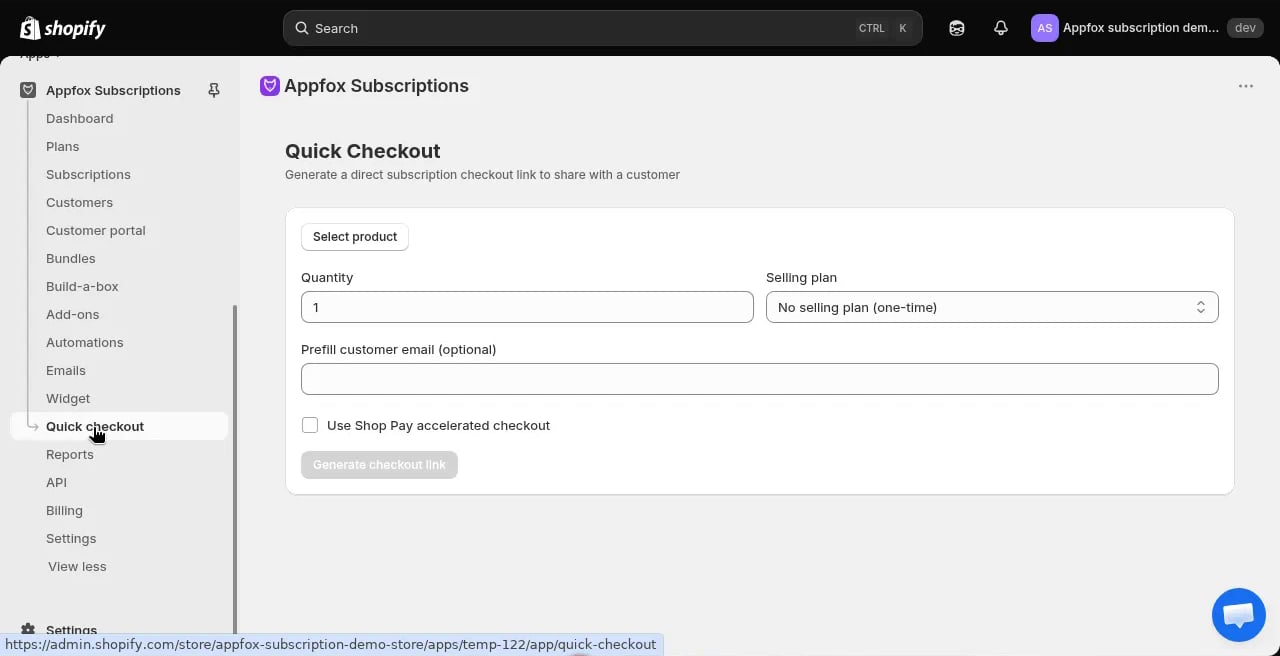
When to use quick checkout
Use quick checkout when:- A customer places a subscription order over the phone
- You want to create a subscription manually for a customer
- A customer requests help setting up a subscription through support channels
Create a subscription with quick checkout
1
Go to Quick checkout
Click Quick checkout in the app navigation.
2
Select a product
Choose the product the customer wants to subscribe to. You can search by product name or SKU.
3
Set the quantity
Enter how many units the customer wants per billing cycle.
4
Choose a selling plan
Select the subscription plan and billing frequency. The available plans depend on which plans include the selected product.
5
Enter customer email
Provide the customer’s email address. They must have a Shopify customer account. If they don’t have one, you’ll need to create it first in your Shopify admin.
6
Ship to accelerated checkout
Check this box if you want to streamline the checkout process. Leave it unchecked for standard checkout flow.
7
Create the subscription
Click Generate subscription link or Process order to complete the setup.
What happens after creation
When you create a subscription through quick checkout:- The subscription contract is created in Shopify
- The customer receives a confirmation email
- The subscription appears in the Subscriptions list
- Billing begins on the schedule you configured
The customer must have a Shopify customer account before you can create a subscription for them. If they don’t have an account, create one in your Shopify admin first.