

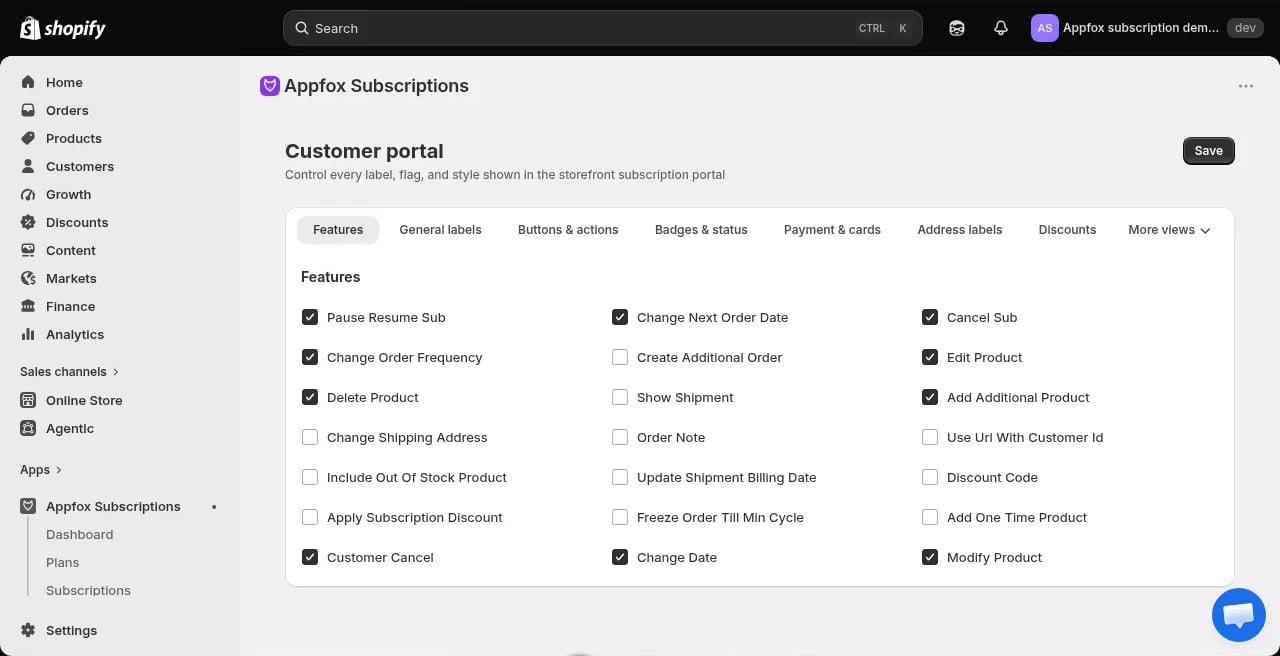
What customers can do
You control which features are available in the customer portal. Enable or disable features based on what you want customers to manage themselves.Subscription management
Two critical toggles control subscription lifecycle actions:- Pause/Resume subscription — When enabled, customers can pause their subscription and later resume it. When disabled, customers cannot pause or resume.
- Cancel subscription — When enabled, customers can cancel their subscription through the portal. When disabled, the cancel button is hidden and customers must contact you to cancel.
If you disable customer cancellation, make sure your support team is prepared to handle cancellation requests. Some jurisdictions require you to offer an easy cancellation method.
Additional features
Other available features include:- Change order frequency — Let customers adjust their billing frequency
- Change next order date — Allow customers to reschedule their next billing
- Swap product — Enable customers to swap products in their subscription
- Edit product — Let customers edit product details or quantities
- Add products — Allow customers to add new products to their subscription
- Remove products — Let customers remove products from their subscription
- Skip next order — Enable customers to skip an upcoming billing cycle
- Update payment method — Allow customers to update their payment information
Configure portal features
1
Go to Customer portal settings
Click Customer portal in the app navigation.
2
Enable features
On the Features tab, toggle each feature on or off. Enabled features appear in the customer portal.
3
Configure settings
For features that require additional setup, click Configure to set parameters like minimum order counts or allowed product categories.
4
Save your changes
Click Save to apply the configuration. Changes take effect immediately.
The customer portal is a Shopify customer account extension, not a standalone URL. Customers access it by logging into their customer account on your store.
Portal tabs
The customer portal organizes features into tabs:- Features: Enable or disable specific self-service actions
- Button actions: Configure button labels and behaviors
- Images & colors: Customize the portal appearance to match your brand
- Layout & wording: Adjust text and layout options