

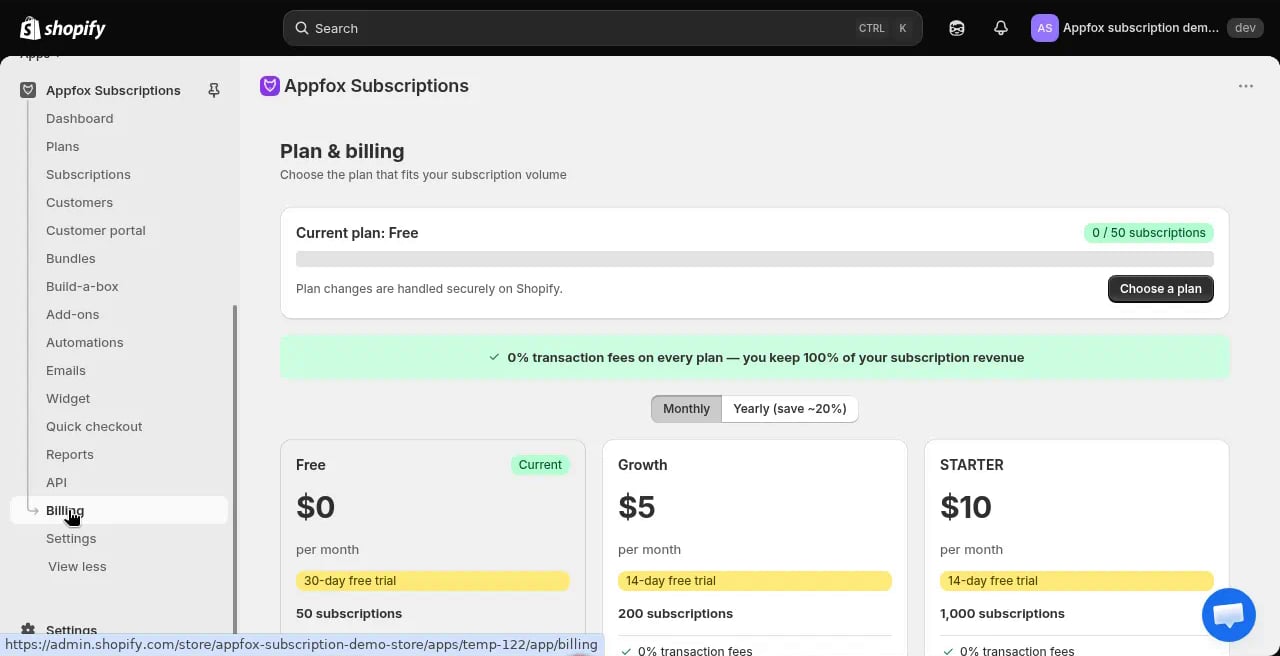
Pricing tiers
Free plan
The Free plan includes basic subscription functionality at no monthly cost:- 0% transaction fees on all subscription orders
- Up to 50 subscriptions
- Core subscription features
Growth plan ($5/month)
The Growth plan adds more capacity:- 0% transaction fees
- Up to 100 subscriptions
- All Free plan features
- Priority email support
Starter plan ($10/month)
The Starter plan supports growing subscription businesses:- 0% transaction fees
- Up to 500 subscriptions
- All Growth plan features
- Subscription analytics
Business plan ($30/month)
The Business plan unlocks advanced features:- 0% transaction fees
- Up to 10,000 subscriptions
- All Starter plan features
- Add-ons and upsells
- Advanced automations
- Custom email templates
- Priority support
Pro plan ($50/month)
The Pro plan is designed for larger subscription businesses:- 0% transaction fees
- Up to 50,000 subscriptions
- All Business plan features
- Dedicated account manager
- Custom integrations
Enterprise plan ($100/month)
The Enterprise plan supports unlimited scale:- 0% transaction fees
- Unlimited subscriptions
- All Pro plan features
- White-glove onboarding
- Custom development
- SLA guarantees
Transaction fees
All Appfox Subscriptions plans charge 0% transaction fees. You keep 100% of your subscription revenue regardless of plan tier.You are still responsible for Shopify’s standard payment processing fees and subscription billing fees. Appfox Subscriptions does not add additional transaction fees.
Change your plan
1
Go to Plan & billing
Click Billing in the app navigation.
2
Review plan options
Compare the features and subscription limits for each tier. Your current plan is highlighted in green.
3
Choose a plan
Click Choose plan under the tier you want to upgrade to.
4
Confirm the upgrade
Review the new pricing and confirm the change. Upgrades take effect immediately.