> ## Documentation Index
> Fetch the complete documentation index at: https://subscriptions-docs.getappfox.com/llms.txt
> Use this file to discover all available pages before exploring further.
# Quick checkout
> Create subscription orders for customers
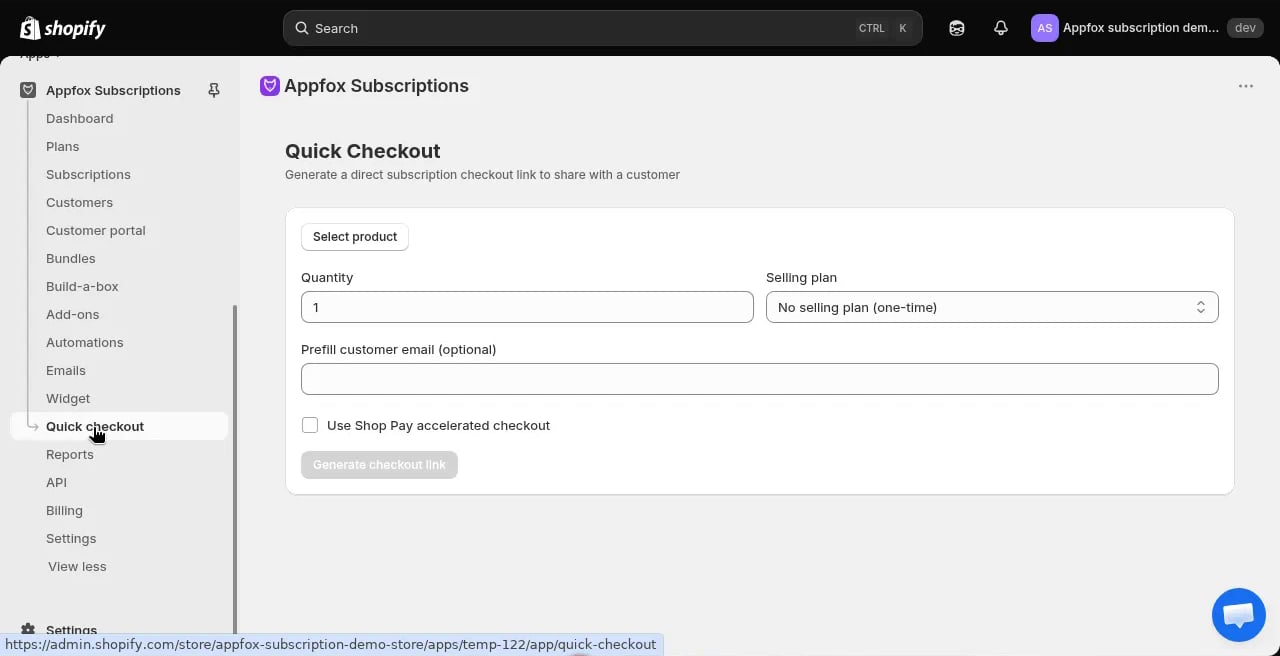
Quick checkout lets you create subscription orders on behalf of customers. This is useful for phone orders, customer service requests, or manual subscription setup.
 ## When to use quick checkout
Use quick checkout when:
* A customer places a subscription order over the phone
* You want to create a subscription manually for a customer
* A customer requests help setting up a subscription through support channels
Quick checkout handles the subscription creation without requiring the customer to go through the storefront checkout flow.
## Create a subscription with quick checkout
Click **Quick checkout** in the app navigation.
Choose the product the customer wants to subscribe to. You can search by product name or SKU.
Enter how many units the customer wants per billing cycle.
Select the subscription plan and billing frequency. The available plans depend on which plans include the selected product.
Provide the customer's email address. They must have a Shopify customer account. If they don't have one, you'll need to create it first in your Shopify admin.
Check this box if you want to streamline the checkout process. Leave it unchecked for standard checkout flow.
Click **Generate subscription link** or **Process order** to complete the setup.
## What happens after creation
When you create a subscription through quick checkout:
1. The subscription contract is created in Shopify
2. The customer receives a confirmation email
3. The subscription appears in the **Subscriptions** list
4. Billing begins on the schedule you configured
The customer can manage the subscription through the customer portal after it's created.
The customer must have a Shopify customer account before you can create a subscription for them. If they don't have an account, create one in your Shopify admin first.
Use quick checkout to help customers who have trouble with the online checkout flow. You can walk them through the product selection over the phone and create the subscription for them.
## When to use quick checkout
Use quick checkout when:
* A customer places a subscription order over the phone
* You want to create a subscription manually for a customer
* A customer requests help setting up a subscription through support channels
Quick checkout handles the subscription creation without requiring the customer to go through the storefront checkout flow.
## Create a subscription with quick checkout
Click **Quick checkout** in the app navigation.
Choose the product the customer wants to subscribe to. You can search by product name or SKU.
Enter how many units the customer wants per billing cycle.
Select the subscription plan and billing frequency. The available plans depend on which plans include the selected product.
Provide the customer's email address. They must have a Shopify customer account. If they don't have one, you'll need to create it first in your Shopify admin.
Check this box if you want to streamline the checkout process. Leave it unchecked for standard checkout flow.
Click **Generate subscription link** or **Process order** to complete the setup.
## What happens after creation
When you create a subscription through quick checkout:
1. The subscription contract is created in Shopify
2. The customer receives a confirmation email
3. The subscription appears in the **Subscriptions** list
4. Billing begins on the schedule you configured
The customer can manage the subscription through the customer portal after it's created.
The customer must have a Shopify customer account before you can create a subscription for them. If they don't have an account, create one in your Shopify admin first.
Use quick checkout to help customers who have trouble with the online checkout flow. You can walk them through the product selection over the phone and create the subscription for them.