> ## Documentation Index
> Fetch the complete documentation index at: https://subscriptions-docs.getappfox.com/llms.txt
> Use this file to discover all available pages before exploring further.
# Reports
> View subscription billing and order reports
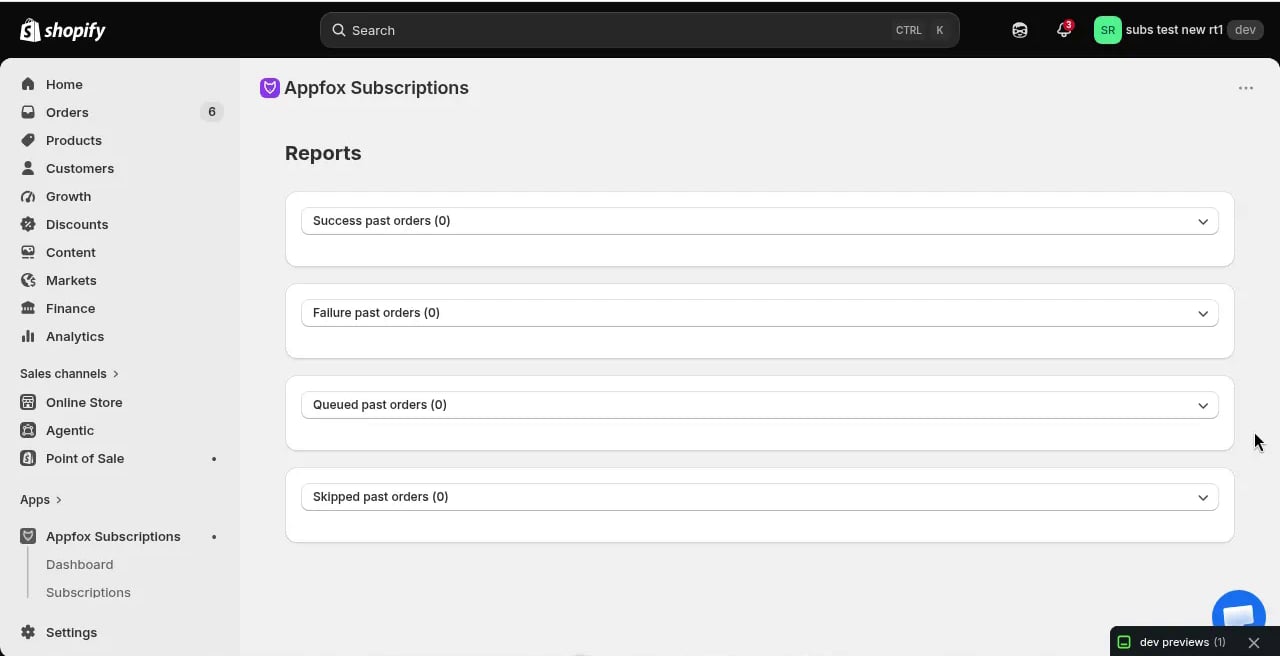
The **Reports** page provides detailed breakdowns of past subscription orders by status. You can review successful, failed, queued, and skipped orders to understand billing performance and identify issues.
 ## Report categories
Reports are organized into four categories based on order outcome:
### Success past orders
This report lists all successfully processed subscription billing attempts. Each row shows:
* Order ID and date
* Customer name
* Products and quantities
* Order amount
* Billing cycle number
Use this report to track completed billing cycles and verify revenue from subscription orders.
### Failure past orders
Failed orders represent billing attempts that couldn't be completed due to payment issues. Common failure reasons include:
* Expired credit card
* Insufficient funds
* Payment gateway errors
* Invalid payment method
Each failed order shows the failure reason and timestamp. You can cross-reference these with the dunning system to see which customers have been notified.
### Queued past orders
Queued orders are subscription billing attempts that were scheduled but not yet processed. This typically happens when:
* The billing date was rescheduled
* The subscription was paused before the billing attempt
* A manual delay was applied
### Skipped past orders
This report shows billing cycles that were intentionally skipped. Orders appear here when:
* A merchant manually skipped a billing cycle
* The subscription was paused during the billing window
* Inventory was unavailable and the order was skipped rather than failed
The app does not support customer-initiated order skipping through the portal. Skipped orders in this report result from merchant actions or system conditions.
## Using reports
Click each report section to expand it and view the full list of orders. You can:
* Export report data for external analysis
* Filter by date range to see specific billing periods
* Search for individual customers or order IDs
* Compare success and failure rates over time
Review the failure report regularly to identify payment issues early. High failure rates may indicate problems with your payment gateway or a need for better dunning communication.
## Report data retention
Reports include all historical billing attempts since you installed the app. There is no data expiration — all past orders remain available for reference.
## Report categories
Reports are organized into four categories based on order outcome:
### Success past orders
This report lists all successfully processed subscription billing attempts. Each row shows:
* Order ID and date
* Customer name
* Products and quantities
* Order amount
* Billing cycle number
Use this report to track completed billing cycles and verify revenue from subscription orders.
### Failure past orders
Failed orders represent billing attempts that couldn't be completed due to payment issues. Common failure reasons include:
* Expired credit card
* Insufficient funds
* Payment gateway errors
* Invalid payment method
Each failed order shows the failure reason and timestamp. You can cross-reference these with the dunning system to see which customers have been notified.
### Queued past orders
Queued orders are subscription billing attempts that were scheduled but not yet processed. This typically happens when:
* The billing date was rescheduled
* The subscription was paused before the billing attempt
* A manual delay was applied
### Skipped past orders
This report shows billing cycles that were intentionally skipped. Orders appear here when:
* A merchant manually skipped a billing cycle
* The subscription was paused during the billing window
* Inventory was unavailable and the order was skipped rather than failed
The app does not support customer-initiated order skipping through the portal. Skipped orders in this report result from merchant actions or system conditions.
## Using reports
Click each report section to expand it and view the full list of orders. You can:
* Export report data for external analysis
* Filter by date range to see specific billing periods
* Search for individual customers or order IDs
* Compare success and failure rates over time
Review the failure report regularly to identify payment issues early. High failure rates may indicate problems with your payment gateway or a need for better dunning communication.
## Report data retention
Reports include all historical billing attempts since you installed the app. There is no data expiration — all past orders remain available for reference.