> ## Documentation Index
> Fetch the complete documentation index at: https://subscriptions-docs.getappfox.com/llms.txt
> Use this file to discover all available pages before exploring further.
# Subscription plans
> Create and manage selling plans
Subscription plans define the billing frequency, discount, and products available for recurring orders. You can create multiple plans with different schedules and pricing options.
 ## Create a plan
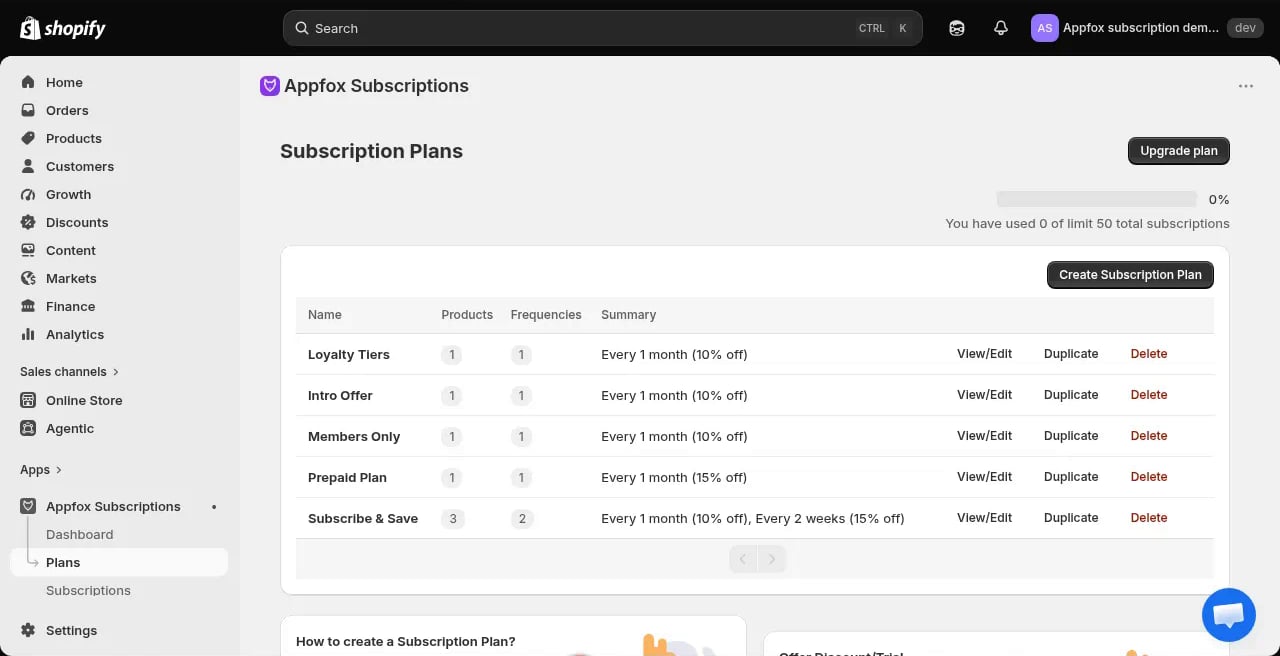
Click **Plans** in the app navigation, then click **Create Subscription Plan**.
Give the plan a customer-facing name. This appears in the widget on product pages.
Select which products are available on this plan. You can add individual products or entire collections.
Choose how often customers are billed. Common options include every 1 month, every 2 weeks, or every 3 months. You can configure multiple frequency options for a single plan.
Set a percentage or fixed-amount discount for recurring orders. The discount applies to every billing cycle.
## Plan settings
## Create a plan
Click **Plans** in the app navigation, then click **Create Subscription Plan**.
Give the plan a customer-facing name. This appears in the widget on product pages.
Select which products are available on this plan. You can add individual products or entire collections.
Choose how often customers are billed. Common options include every 1 month, every 2 weeks, or every 3 months. You can configure multiple frequency options for a single plan.
Set a percentage or fixed-amount discount for recurring orders. The discount applies to every billing cycle.
## Plan settings
 ### Frequency and schedule
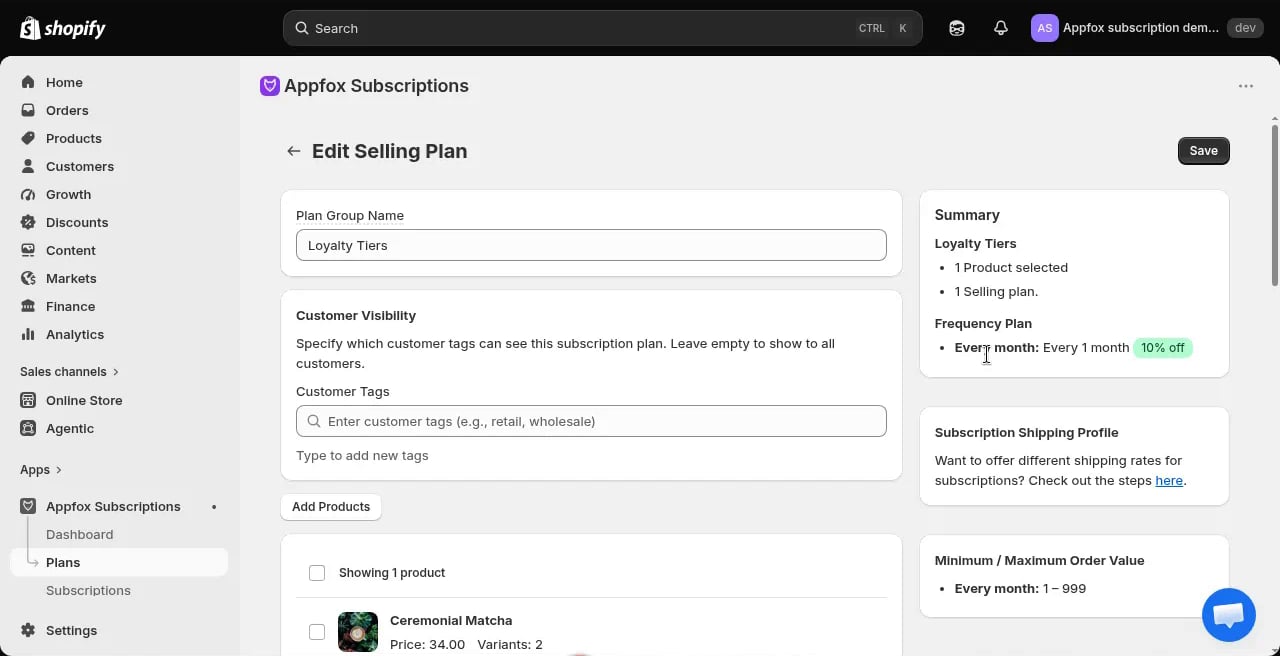
You can offer one or more billing frequencies per plan. Customers choose their preferred frequency when they subscribe.
The billing date is set when the customer places their first order. Each subsequent billing happens on the same day of the interval you configured.
### Discount types
* **Percentage discount**: Take 10%, 20%, or any percentage off each order
* **Fixed amount discount**: Reduce each order by a dollar amount
The discount applies automatically to every recurring order.
### Intro pricing
Intro pricing lets you offer a time-limited discount on the first few billing cycles. Configure it in the **Discount** section.
* **Intro discount amount**: The reduced price or percentage for the introductory period
* **Duration**: How many billing cycles the intro pricing lasts
After the intro period ends, the plan reverts to the standard discount.
Intro pricing is not a free trial. Customers are charged at the intro rate starting with the first order.
### Loyalty tiers
You can configure up to two loyalty tiers per plan. Each tier grants an additional discount after the customer has been subscribed for a set number of billing cycles.
For example, you might offer:
* 10% off for all subscribers
* An extra 5% off after 6 billing cycles
* An extra 10% off after 12 billing cycles
Loyalty discounts stack with the base plan discount.
## Advanced settings
### Minimum number of orders
Set a minimum commitment for the subscription. Customers must complete at least this many billing cycles before they can cancel.
### Minimum cycles before customer cancel
Set a plan-level cancellation guard. Customers cannot cancel until they've completed this many billing cycles, even if they want to. This is separate from the minimum commitment above — use it when you need to enforce a specific retention period for this plan.
This setting applies only to customer-initiated cancellations in the customer portal. Merchants can always cancel through the admin, and the Enterprise contract API is not blocked by this setting.
If both minimum settings are configured, the plan-level "Minimum cycles before customer cancel" takes precedence over the contract-level minimum commitment.
### Change on specific days
Configure the billing schedule to only charge on certain days of the week or month. This is useful if your fulfillment runs on a fixed schedule.
### Subscription cutoff day
Choose when in the billing cycle customers can no longer make changes. This helps you prepare orders for fulfillment without last-minute edits.
## Manage plans
You can view, edit, duplicate, or delete plans from the **Plans** page.
### Price grandfathering
When you change a plan's price, the change only affects new subscriptions. Existing customers stay at their original price — Shopify snapshots the price when the contract is created and does not automatically update it when you edit the plan.
This behavior is called "price grandfathering" and protects existing customers from unexpected price increases.
**Example:** You have a plan priced at €80/month with 100 active subscriptions. If you raise the price to €88/month:
* New customers who subscribe pay €88/month
* Existing customers continue paying €80/month
If you want to reprice existing contracts, you must edit them individually through the **Subscriptions** page.
Merchants can manually change the price on individual contracts, but plan price edits never propagate to existing subscriptions automatically.
Test your plans with a test order before going live. Create a subscription in your development store and verify the billing schedule and discounts.
### Frequency and schedule
You can offer one or more billing frequencies per plan. Customers choose their preferred frequency when they subscribe.
The billing date is set when the customer places their first order. Each subsequent billing happens on the same day of the interval you configured.
### Discount types
* **Percentage discount**: Take 10%, 20%, or any percentage off each order
* **Fixed amount discount**: Reduce each order by a dollar amount
The discount applies automatically to every recurring order.
### Intro pricing
Intro pricing lets you offer a time-limited discount on the first few billing cycles. Configure it in the **Discount** section.
* **Intro discount amount**: The reduced price or percentage for the introductory period
* **Duration**: How many billing cycles the intro pricing lasts
After the intro period ends, the plan reverts to the standard discount.
Intro pricing is not a free trial. Customers are charged at the intro rate starting with the first order.
### Loyalty tiers
You can configure up to two loyalty tiers per plan. Each tier grants an additional discount after the customer has been subscribed for a set number of billing cycles.
For example, you might offer:
* 10% off for all subscribers
* An extra 5% off after 6 billing cycles
* An extra 10% off after 12 billing cycles
Loyalty discounts stack with the base plan discount.
## Advanced settings
### Minimum number of orders
Set a minimum commitment for the subscription. Customers must complete at least this many billing cycles before they can cancel.
### Minimum cycles before customer cancel
Set a plan-level cancellation guard. Customers cannot cancel until they've completed this many billing cycles, even if they want to. This is separate from the minimum commitment above — use it when you need to enforce a specific retention period for this plan.
This setting applies only to customer-initiated cancellations in the customer portal. Merchants can always cancel through the admin, and the Enterprise contract API is not blocked by this setting.
If both minimum settings are configured, the plan-level "Minimum cycles before customer cancel" takes precedence over the contract-level minimum commitment.
### Change on specific days
Configure the billing schedule to only charge on certain days of the week or month. This is useful if your fulfillment runs on a fixed schedule.
### Subscription cutoff day
Choose when in the billing cycle customers can no longer make changes. This helps you prepare orders for fulfillment without last-minute edits.
## Manage plans
You can view, edit, duplicate, or delete plans from the **Plans** page.
### Price grandfathering
When you change a plan's price, the change only affects new subscriptions. Existing customers stay at their original price — Shopify snapshots the price when the contract is created and does not automatically update it when you edit the plan.
This behavior is called "price grandfathering" and protects existing customers from unexpected price increases.
**Example:** You have a plan priced at €80/month with 100 active subscriptions. If you raise the price to €88/month:
* New customers who subscribe pay €88/month
* Existing customers continue paying €80/month
If you want to reprice existing contracts, you must edit them individually through the **Subscriptions** page.
Merchants can manually change the price on individual contracts, but plan price edits never propagate to existing subscriptions automatically.
Test your plans with a test order before going live. Create a subscription in your development store and verify the billing schedule and discounts.